There are two simple methods to get administrator access in DOS shell in Windows XP. Both methods are too simple and there is no confusions or complications in it. Quite simple. Here is the steps
Method 1
1. Start -> run -> type "cmd"
[DOS shell comes]
2. Type the following
runas /user:computername\administrative user name cmd
eg: if computer name is "system1" and administrative user name is "administrator" then the command will be
runas /user:system1\administrator cmd
[a new DOS Shell will appear and you can execute your administrative tasks]
;-) Too simple, eh?
Method 2
[May be you'll laugh when you read out this one!]
1. Go to c:\WINDOWS\system32\
[click on the "Show the contents of this folder"]
2. RIght-click on cmd.exe and select "Run as..."
[Give administrator user name and password]
Too too tooo simple... ;-) ...?
Friday, May 08, 2009


Saturday, March 21, 2009
TAKE CARE WHEN YOU USE USB FLASH DRIVES
 Flash drives are just like whores
If you have a USB flash drive, just have some advice, especially if you are a Windows user. Because a flash drive may present you worst infections. It may steal your valuable system resources. It may cause other machines get infected.
Here is some rules to use USB Flash drives. I will write down one by one.
Rule 1.
Do not completely trust thy anti virus programme. Trust only a system restore.
Anti virus programme is actually designed for dummies. Not for experts. There are lots of anti virus vendors in the software world. Most virus programme codes and codes for such malwares are written by these companies. If you install an antiviurus, it will eat your valuable resources and memory. If you decide to avoid anti-virus, you must create a system restore point.
Rule 2.
Windows helps virus to play
The most ugliest feature of the Windows OS, is autoplay. When you insert a CD or DVD or a USB Flash drive, it plays an executable file plays automatically, if there is an autorun.inf file present. The file is being executed without your permission. Sometimes, you may not know if there is a file is being executed... So you have to remove such auto play mechanism.
Steps to disable autoplay mechanism
> start > run > gpedit.msc > computer configuration > Administrative templates > system > turn off autoplay
• enabled > turn off autoplay on • all drives
This will turn autoplay mechanism on all your removable drives. It will prevent opening of autorun.inf file commands. But the mounting of the flash drive will be done automatically.
Rule 3.
Do not double click in the removable disk icon.
Even if you disabled autoplay mechanism, you must not double click on any of the removable media drive icon. Just right-click and open only. When you double click on a removable drive, it means that you give permission to execute the autoplay. Unless you are sure, you must not double click on a removable drive icon. Only right-click and then open.
Rule 4.
If you doubt that your system is infected, try to remove it manually.
Try to find out which programme is running in the task manager. Search each and every programmes in google or your favourite search engines. If the task manager itself is not working, your system is almost damaged. In this point you can call for a system restore.
If the USB Flash drive contains some trojans in it, you can identify it easily. Just open the flash drive in cmd (Dos shell of Windows.)
There are some commands to check and remove the malware files.
1. dir/ah (to find hidden files): If there is hidden files are present, and the hidden files included in your flash drive without your knoledge and your permission, just delete it. But you have to remove the attributes of the hidden file first.
2. attrib filename.ext : This command shows the attributes of the unwanted file. If the file has SHR attributes you have to remove all attributes, only then you can delete the file
3. attrib -s -h -r filename.ext : This command removes all the attributes.
4. del filename.ext : delete the file from the disk
Friday, March 20, 2009
Just going to enter in the FreeBSD World

A couple of days, I wandered from sites to sites in the internet. After an hour or two, as always, I fell down in the subject - Open Source. This time I was searching for Unix evolution and finally I reached in the FreeBSD project. I called Saju, my Linux guru, and he told me that bsd is fine, but hard to manage. Almost all experts in the internet say the same opinion. Considering the comparison between Debian and Freebsd, most system administrators conclude that Debian is better in management.
But I always loved the bsd devil. I love its horns... I started download from the official torrentz link. And I am planning to experiment it with a free 10 GB Hdd which is now using as a backup disk. I have also created a sticker for the DVD just exactly as freebsd.org shown in their website. If you want to download it, here is the link.

Friday, December 21, 2007
How to set first post on top in blogger
Here is some easy steps
1. Go to blogger.com to get your dashboard
2. Select the "Settings" in the desired blog
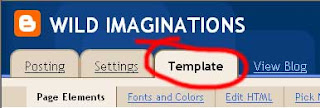
3. Click on the "Template" tab
4. In "Blog Archives", Select "Edit" Button1. Go to blogger.com to get your dashboard
2. Select the "Settings" in the desired blog
3. Click on the "Template" tab
5. In options, check "Show oldest post last"6. Save changes Thus you can sort your first post in top and oldest post in bottom position. Happy blogging!


Thursday, July 05, 2007
ORKUT; A FUNNY TROJAN ATTACKS!
Recently some of my friends called me to fix their orkut from some devil obsession!
I thought it might be something silly. But that was a Trojan activity. I found that there was an mp3 file which lets the sound is playing at the end of the Display of the following lines
" ORKUT IS BANNED,Orkut is banned you fool`,The
administrators didnt write this program guess who did?? "
:: REMOVAL INSTRUCTIONS ::• Press Ctrl+Alt+Del to open Task Manager. Then click on the Process tab.
• Delete the SVChost.exe file that comes with system's user name.
• Ignore the warning messages while doing that.
• Go to C:/Heap41a using RUN option and delete the contents of the folder.
• Now you will be able to use Orkut without any hassles.
I thought it might be something silly. But that was a Trojan activity. I found that there was an mp3 file which lets the sound is playing at the end of the Display of the following lines
" ORKUT IS BANNED,Orkut is banned you fool`,The
administrators didnt write this program guess who did?? "
:: REMOVAL INSTRUCTIONS ::• Press Ctrl+Alt+Del to open Task Manager. Then click on the Process tab.
• Delete the SVChost.exe file that comes with system's user name.
• Ignore the warning messages while doing that.
• Go to C:/Heap41a using RUN option and delete the contents of the folder.
• Now you will be able to use Orkut without any hassles.
Friday, April 13, 2007
Yousendit.com - wonderful file sharing service
One of the best services in file sharing. If you have a huge file - may it be a video file or high resolution tif file or pdf or mp3 or whatever, normally you cannot sent it as email attachment. There comes yousendit.com. A wonderful file hosting service available in the web. How big may your files be, dont worrry, you can send them via yousendIt, upto 100 downloads or 7 days whichever come earlier, the file will be deleted. A wonderul idea, the only thing is that you cannot permanently host a file. If thats not your intention, its ok ok.
YouSendIt lets businesses, professionals and consumers move big files. If you know how to use email, you can easily use the YouSendIt service. YouSendIt currently has over 3 million registered users across 220 countries and over 13,000 paid users. More than 400 million files have been transferred using the service and YouSendIt is transferring over 1 million files with 30,000 gigabytes daily.
YouSendIt lets businesses, professionals and consumers move big files. If you know how to use email, you can easily use the YouSendIt service. YouSendIt currently has over 3 million registered users across 220 countries and over 13,000 paid users. More than 400 million files have been transferred using the service and YouSendIt is transferring over 1 million files with 30,000 gigabytes daily.
Monday, April 09, 2007
Some emergency or 112 thoughts
One One Two. What is it? What is the importance of that number of a GSM mobile phone user?
1-1-2 is a toll-free telephone emergency number from any telephone or any GSM cellphone. Originally this number was the single European emergency call number. In most of the GSM handsets, 112 can be called even in Key lock position. But unfortunately in India, this number can be accessed properly from very few service providers. Generally in India, the emergency numbers are not standardized. There is no single emergency call number. Most of the Indian cities use 100 for Police and 101 for ambulance. But while, a major share of people use mobile phones, why don't we turn to use 112 as single emergency number system. This talk must be discussed by agencies like TRAII and GSM service providers.
1-1-2 is a toll-free telephone emergency number from any telephone or any GSM cellphone. Originally this number was the single European emergency call number. In most of the GSM handsets, 112 can be called even in Key lock position. But unfortunately in India, this number can be accessed properly from very few service providers. Generally in India, the emergency numbers are not standardized. There is no single emergency call number. Most of the Indian cities use 100 for Police and 101 for ambulance. But while, a major share of people use mobile phones, why don't we turn to use 112 as single emergency number system. This talk must be discussed by agencies like TRAII and GSM service providers.
When to call the 112 ?
Call the 112 only in real life-threatening emergencies like:
• Serious medical problems (unconscious person, important injuries, chest pain, seizure, bleeding)
• Any type of fire (house, car, business)
• Life-threatening situations (crimes, fights, people with weapons, robbery in progress, etc)
Do not call the 112 :
• To test your mobile phone - you may block a real life-threatening emergency call
• To laugh at the operators or to just hang up - respect operators who work under stress to help save lives, do not block real emergency calls by blocking lines
• For non life-threatening emergencies or non-emergencies like property damage accidents, break-in to vehicles, theft of property, vandalism - especially when the suspect is gone - cars blocking the street. Call directly the local police.
Stay calm Stay safe - avoid having an accident yourself.
What to say ?
• Where is the assistance needed (Location)
• Your name and telephone number
• What happened (nature of the emergency) and if it is happening now
• Who needs help or is involved and how many (victims, suspects, etc.)
• Why is the emergency happening (i.e. depression) and obstacles to the arrival of emergency services
• Are weapons involved ? (knives, hand-guns, automatic weapons)
Be prepared.
• To launch a 112 call - observe and exercise mentally
• Get training in your company or in the context of your community as a first aid helper or as a first responder - you will be able to help yourself and your neighbors
• And remember - prevention is always better and more efficient
Some useful Links:
http://en.wikipedia.org/wiki/In_case_of_emergency
http://112eu.blogspot.com/
http://www.112.be/view/en/citizen/learn_about.html
Call the 112 only in real life-threatening emergencies like:
• Serious medical problems (unconscious person, important injuries, chest pain, seizure, bleeding)
• Any type of fire (house, car, business)
• Life-threatening situations (crimes, fights, people with weapons, robbery in progress, etc)
Do not call the 112 :
• To test your mobile phone - you may block a real life-threatening emergency call
• To laugh at the operators or to just hang up - respect operators who work under stress to help save lives, do not block real emergency calls by blocking lines
• For non life-threatening emergencies or non-emergencies like property damage accidents, break-in to vehicles, theft of property, vandalism - especially when the suspect is gone - cars blocking the street. Call directly the local police.
Stay calm Stay safe - avoid having an accident yourself.
What to say ?
• Where is the assistance needed (Location)
• Your name and telephone number
• What happened (nature of the emergency) and if it is happening now
• Who needs help or is involved and how many (victims, suspects, etc.)
• Why is the emergency happening (i.e. depression) and obstacles to the arrival of emergency services
• Are weapons involved ? (knives, hand-guns, automatic weapons)
Be prepared.
• To launch a 112 call - observe and exercise mentally
• Get training in your company or in the context of your community as a first aid helper or as a first responder - you will be able to help yourself and your neighbors
• And remember - prevention is always better and more efficient
Some useful Links:
http://en.wikipedia.org/wiki/In_case_of_emergency
http://112eu.blogspot.com/
http://www.112.be/view/en/citizen/learn_about.html
Wednesday, April 04, 2007
PORTABLE APPS
I But now I got a permanent solution when I get info on Portable apps. Now I can carry my favourite computer programmes with all of my bookmarks, settings, plug-ins, anything and everything with that. All without leaving any personal data behind.
PortableApps.com provides a truly open platform that works with any hardware you like (USB flash drive, iPod, portable hard drive, etc). It's open source built around an open format that any hardware vendor or software developer can use.
I love Portable MFf more than the real Mff. Because, it has some additional features which real MFf lacks. The auto spell checking plug-in is an amazing feature of Portable MFf. The saved bookmarks will be saved permanently. Forget restrictions of your damned System Administrators.
Browse with Portable MFf, Chat with GAIM Portable, Upload with File Zilla Portable, mail with Thunderbird Portable… Everything.
The Portable Apps Suite™ is free. It contains no spyware. There are no advertisements. It isn't a limited or trial version. There is no additional hardware or software to buy. You don't even have to give out your email address. It's 100% free to use, free to copy and free to share.
There are lots of quality Portable Apps provided by PortableApps.com. Some of them are:
Development
• Nvu Portable & KompoZer Portable - The easy-to-use Nvu web editor
• XAMPP - Apache, mySQL, PHP, phpMyAdmin and more in an integrated package
Games
• Sudoku Portable - the wildly popular and addictive puzzle game
Graphics & Pictures
• GIMP Portable - Photo and Image Editor
Internet
• FileZilla Portable - the full-featured FTP client
• FireFTP Extension (for Firefox) - a lightweight extension
• Gaim Portable - chat with AOL, MSN and Yahoo users in an easy-to-use interface
• Miranda IM Portable - chat with AOL, MSN and Yahoo users in a customizable interface
• Mozilla Firefox, Portable Edition - the award-winning web browser that's safe and secure
• Mozilla Thunderbird, Portable Edition - the handy email client
• Nvu Portable & KompoZer Portable - the easy-to-use webpage editor
• PuTTY Portable - lightweight telnet and SSH client
• Sage Extension (for Firefox) - A full-featured RSS extension
Music & Video
• Audacity Portable - A simple audio editor and recorder
• VLC Media Player Portable - An easy to use media player that plays most audio and video formats
Office
• AbiWord Portable - a lightweight word processor compatible with Microsoft Word files.
• Lightning Extension (for Thunderbird) - A lightweight extension for your calendar and tasks.
• Mozilla Sunbird, Portable Edition - Calendar and task management with a familiar interface.
• Mozilla Thunderbird, Portable Edition (Address Book) - Email client's built-in address book with import/export functions.
• OpenOffice.org Portable - word processor, spreadsheet, presentations with Microsoft compatibility.
• Sumatra PDF Portable - a lightweight PDF viewer.
Operating Systems
• Mac-on-Stick - Run Mac OS Classic 7 portably.
Utilities
• 7-Zip Portable - File archiver and compressor.
• ClamWin Portable - Antivirus on the go.
• KeePass Password Safe Portable - Secure, easy-to-use password manager.
• PortableApps.com Backup - integrated backup utility bundled with the platform.
• PortableApps.com Menu - integrated start menu bundled with the platform.
.... Amazing...? Go to the [world of portable apps]
• There is one major Mozilla product is missing in the portable world – SeaMonkey. I hope that Seamonkey will come soon in the family of portable apps
• Nvu Portable & KompoZer Portable - The easy-to-use Nvu web editor
• XAMPP - Apache, mySQL, PHP, phpMyAdmin and more in an integrated package
Games
• Sudoku Portable - the wildly popular and addictive puzzle game
Graphics & Pictures
• GIMP Portable - Photo and Image Editor
Internet
• FileZilla Portable - the full-featured FTP client
• FireFTP Extension (for Firefox) - a lightweight extension
• Gaim Portable - chat with AOL, MSN and Yahoo users in an easy-to-use interface
• Miranda IM Portable - chat with AOL, MSN and Yahoo users in a customizable interface
• Mozilla Firefox, Portable Edition - the award-winning web browser that's safe and secure
• Mozilla Thunderbird, Portable Edition - the handy email client
• Nvu Portable & KompoZer Portable - the easy-to-use webpage editor
• PuTTY Portable - lightweight telnet and SSH client
• Sage Extension (for Firefox) - A full-featured RSS extension
Music & Video
• Audacity Portable - A simple audio editor and recorder
• VLC Media Player Portable - An easy to use media player that plays most audio and video formats
Office
• AbiWord Portable - a lightweight word processor compatible with Microsoft Word files.
• Lightning Extension (for Thunderbird) - A lightweight extension for your calendar and tasks.
• Mozilla Sunbird, Portable Edition - Calendar and task management with a familiar interface.
• Mozilla Thunderbird, Portable Edition (Address Book) - Email client's built-in address book with import/export functions.
• OpenOffice.org Portable - word processor, spreadsheet, presentations with Microsoft compatibility.
• Sumatra PDF Portable - a lightweight PDF viewer.
Operating Systems
• Mac-on-Stick - Run Mac OS Classic 7 portably.
Utilities
• 7-Zip Portable - File archiver and compressor.
• ClamWin Portable - Antivirus on the go.
• KeePass Password Safe Portable - Secure, easy-to-use password manager.
• PortableApps.com Backup - integrated backup utility bundled with the platform.
• PortableApps.com Menu - integrated start menu bundled with the platform.
.... Amazing...? Go to the [world of portable apps]
• There is one major Mozilla product is missing in the portable world – SeaMonkey. I hope that Seamonkey will come soon in the family of portable apps
Friday, December 01, 2006
HOW TO SAVE SWF FILES FROM MOZILLA FIREFOX
For so many months I wasn't able to save some cute swf files from my Mozilla FireFox. I could save it easily from Tools -> Page Info earlier, but due to some unknow reasons I was unable to save that method. I got that golden days back again with the help or the following site:
http://labnol.blogspot.com/2005/11/save-flash-from-firefox-and-ie.html
Their method is simple very simple to geeks and Power Users. Just have a look:
http://labnol.blogspot.com/2005/11/save-flash-from-firefox-and-ie.html
Their method is simple very simple to geeks and Power Users. Just have a look:
a. Type about:blank in the Firefox address bar
b. Now click List cache entries or directly type about:cache?device=disk (Disk cache device)
c. Press Ctrl+F and try to location the flash file by typing some part of website URL or the flash file name or just .swf. After some hit and trial, you should be able to locate the swf file URL
d. Click the SWF URL to open the Cache Entry Information page. Right click on the link and choose "Save link as"
b. Now click List cache entries or directly type about:cache?device=disk (Disk cache device)
c. Press Ctrl+F and try to location the flash file by typing some part of website URL or the flash file name or just .swf. After some hit and trial, you should be able to locate the swf file URL
d. Click the SWF URL to open the Cache Entry Information page. Right click on the link and choose "Save link as"
Monday, November 20, 2006
GET YOUR DOMAIN DETAILS
If you are a domain owner, it’s very important that you keep the domain record up-to-date. It’s really important. There are lots of tools available in internet. You can check your MX Record, CNAME entries, A Record NS Record and everything. Here is some useful list of URLs: Have a look at them:
http://www.dnsstuff.com/http://www.bigbiz.com/domain.html
http://www.mailenable.com/dnstools
Have fun. Go!
Tuesday, October 31, 2006
FREE FILE HOSTING @ FILE LODGE

Want to upload your favourite files to shaer with outhers even without paying? Yes, there is solutions. Just register @ http://filelodge.bolt.com/main.php
Its FILELODGE. A true lodge for your files. May it be light or huge, they lodge your files.
File Lodge is a free file hosting provider especially designed to look after you and your files. They offer a huge 500MB of file storage and support almost all file extensions, such as jpg, gif, mpg, avi, wmv, doc, pdf, mp3 etc. Bandwidth is unlimited.
What is a file host? A file host is a website that allows you to upload files to its servers, you are then provided with links for you to post on your favourite forums / webpages / blogs / auctions / in emails, anywhere you wish!
Perfect for sharing photos/images, music, and video with friends and family. They also provide hyperlinks of the uploaded files too. This allows you to quickly and easily get your files live wherever you are using them.A detailed FAQ is availabe in the site and if your questions remain un-answered, you can email them too.
Here, in this blog I used their services to host some of the pdf files for downloads. [But still I am reviewing the site and their services.]
MAZHA - SACHIDANANDAN

Mazhayude Nanartham can be translated in English as Synonyms of Rain.
Mazha - thats the most nostalgic word in Malayalam. How many mazhas do you know? Perumazha, podimazha, chattalmazha, etc. Local names are numerous. How many songs are there about Mazha in Malayalam? Impossible to count. Almost all the poets described mazha in their works.
The poem Mazhayude Nanartham, written by Sachidanandan is the notable one about mazha. Wide range of metophers and similies are used abundantly in this poem. After completely read this poem, you will feel that you are wet in a rain. You will feel its cold. Read. Download the Pdf file. To download the file, just right click and choose 'Save Link as' and show a location to save. Enjoy. Have a nice time.
Mazha - thats the most nostalgic word in Malayalam. How many mazhas do you know? Perumazha, podimazha, chattalmazha, etc. Local names are numerous. How many songs are there about Mazha in Malayalam? Impossible to count. Almost all the poets described mazha in their works.
The poem Mazhayude Nanartham, written by Sachidanandan is the notable one about mazha. Wide range of metophers and similies are used abundantly in this poem. After completely read this poem, you will feel that you are wet in a rain. You will feel its cold. Read. Download the Pdf file. To download the file, just right click and choose 'Save Link as' and show a location to save. Enjoy. Have a nice time.
RAJALAKSHMI - MALAYALAM WRITER
Rajalakshmi (1930-3965) Born on 2nd June 1930, Amayankod family at Cherpulassery, Palakkad. Father Mararth Achutha Menon. Mother Kutty Malu Amma. She committed suicide on on 18th January 1965. As a notable writer she got Kerala Sahithya Academy Award on 1960 for her work “Oru Vazhiyum Kure Nizhalukalum”. Here is her famous poem “Ninne Njan Snehikkunnu”
Friday, October 20, 2006
ASCII TEXT
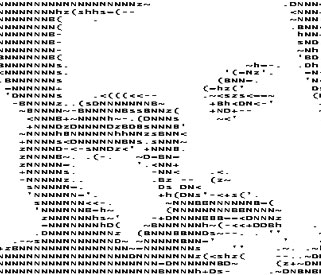
Do these crazy characters say something? Can you ever imagine that I have such patience in keying in such crazy characters to form such a self portrait? Probably no. Then how did I create it? There is some online software to convert an image to ASCII formatted text! All you need to do is to create a 60 x 50 pixel file and upload to the following site:
http://www.typorganism.com/asciiomatic/
It will transform the image to ASCII text. Wanna try?
Saturday, September 16, 2006
ETTERCAP - POWERFUL ARP SPOOFER
As I always say, you can never rely your privacy on your system. Anybody can access your data without your knowledge. Especially when you chat, when you send an email, anything you upload to a server. In your LAN, if there is any poisoners, s/he can sniff all your privacy. What is the result, loss of your passwords, loss of your peace of mind, loss of your money. Just watch the following article on ettercap - one of the hot ARP Spoofer.
EtterCap is a multipurpose sniffer / interceptor / logger for a switched LAN. It supports active and passive dissection of many protocols (even ciphered ones) and includes many features for network and host analysis.
These features include
1. Characters injection in an established connection: You can inject character to server (emulating commands) or to client (emulating replies) maintaining the connection alive! 2. SSH1 support: you can sniff User and Pass, and even the data of an SSH1 connection. 3. HTTPS support: you can sniff http SSL secured data... and even if the connection is made through a PROXY 4. Remote traffic through GRE tunnel: you can sniff remote traffic through a GRE tunnel from a remote Cisco router and make mitm attack on it 5. PPTP broker: you can perform man in the middle attack against PPTP tunnels 6. Password collector for: TELNET, FTP, POP, RLOGIN, SSH1, ICQ, SMB, MySQL, HTTP, NNTP, X11, NAPSTER, IRC, RIP, BGP, SOCKS 5, IMAP 4, VNC, LDAP, NFS, SNMP, HALF LIFE, QUAKE 3, MSN, YMSG. 7. Packet filtering/dropping: You can set up a filter that search for a particular string (even hex) in the TCP or UDP payload and replace it with yours or drop the entire packet. 8. OS fingerprint: you can fingerprint the OS of the victim host and even its network adapter 9. Kill a connection: from the connections list you can kill all the connections you want 10. Passive scanning of the LAN: you can retrieve info about: hosts in the LAN, open ports, services version, type of the host (gateway, router or simple host) and estimated distance in hop. 11. Check for other poisoners: EtterCap has the ability to actively or passively find other poisoners on the LAN.
Yes. Next time when you get lost into your machine, think about this. Somebody may watching you. Caution! Thats all!
EtterCap is a multipurpose sniffer / interceptor / logger for a switched LAN. It supports active and passive dissection of many protocols (even ciphered ones) and includes many features for network and host analysis.
These features include
1. Characters injection in an established connection: You can inject character to server (emulating commands) or to client (emulating replies) maintaining the connection alive! 2. SSH1 support: you can sniff User and Pass, and even the data of an SSH1 connection. 3. HTTPS support: you can sniff http SSL secured data... and even if the connection is made through a PROXY 4. Remote traffic through GRE tunnel: you can sniff remote traffic through a GRE tunnel from a remote Cisco router and make mitm attack on it 5. PPTP broker: you can perform man in the middle attack against PPTP tunnels 6. Password collector for: TELNET, FTP, POP, RLOGIN, SSH1, ICQ, SMB, MySQL, HTTP, NNTP, X11, NAPSTER, IRC, RIP, BGP, SOCKS 5, IMAP 4, VNC, LDAP, NFS, SNMP, HALF LIFE, QUAKE 3, MSN, YMSG. 7. Packet filtering/dropping: You can set up a filter that search for a particular string (even hex) in the TCP or UDP payload and replace it with yours or drop the entire packet. 8. OS fingerprint: you can fingerprint the OS of the victim host and even its network adapter 9. Kill a connection: from the connections list you can kill all the connections you want 10. Passive scanning of the LAN: you can retrieve info about: hosts in the LAN, open ports, services version, type of the host (gateway, router or simple host) and estimated distance in hop. 11. Check for other poisoners: EtterCap has the ability to actively or passively find other poisoners on the LAN.
Yes. Next time when you get lost into your machine, think about this. Somebody may watching you. Caution! Thats all!
ULTRASHOCK.COM - FLASH DESIGN ENGINE
www.ultrashock.com
See. One of my favourite web site in flash technology.
Just see the bottom of this blog now. Its a ticker from ultrashock. A very sexy flash ticker I ever saw. The most sexiest. Do you want to have this ticker in your website? Just add the iframe in the appopriate place. Get the page source and copy the iframe code in your site. From now on the latest Ultrashock News Headlines, Hot Forum Topics & Ultra Statistics are available inside this banner. All headlines are clickable and go directly to the corresponding url on Ultrashock.com. This banner is mainly a result of the hard work by Peter Elst (killer coding dude of Ultrashock) and Peter Van den Wyngaert (graphics) and the mySQL headaches cleared by some Miko.
AND YOU SAY HOWZ IT :-)
From Ultrashock.com, you can download uncountable fla sourse files and some killer tutorials. If you are a flash developer, ultrashock is your final resourse. The forum @ ultrashock will clear most of your doubt and will make you confident.
See. One of my favourite web site in flash technology.
Just see the bottom of this blog now. Its a ticker from ultrashock. A very sexy flash ticker I ever saw. The most sexiest. Do you want to have this ticker in your website? Just add the iframe in the appopriate place. Get the page source and copy the iframe code in your site. From now on the latest Ultrashock News Headlines, Hot Forum Topics & Ultra Statistics are available inside this banner. All headlines are clickable and go directly to the corresponding url on Ultrashock.com. This banner is mainly a result of the hard work by Peter Elst (killer coding dude of Ultrashock) and Peter Van den Wyngaert (graphics) and the mySQL headaches cleared by some Miko.
AND YOU SAY HOWZ IT :-)
From Ultrashock.com, you can download uncountable fla sourse files and some killer tutorials. If you are a flash developer, ultrashock is your final resourse. The forum @ ultrashock will clear most of your doubt and will make you confident.
Saturday, July 22, 2006
WIKIMAPIA - A NEW MILESTONE IN EARTH MAPING
Wikimapia. A fantastic projects using google maps API. As they describe themselves it's really "a project to describe the whole planet Earth."You can create hotspots on your favourate landmarks in wikimapia maps. But they humbly request you to avoid adding hotspots like "This my house" stuff marks. The site got attention of the global internet community's attention without making any ad campaigns or any propoganda hypes. Its because of only quality in the stuff. You need using it for only once to understand its userfriendliness. Even any beginner can use that very instantly.
In the early times no search engines brought me any sites with the keyword "wikimapia". But after a couple of days, I got about 47,400 pages with the same keyword. It's growth is really amazing.
The founders of Wikimapia are Alexandre Koriakine and Evgeniy Saveliev, "inspired by Google maps and Wikipedia."
In the early times no search engines brought me any sites with the keyword "wikimapia". But after a couple of days, I got about 47,400 pages with the same keyword. It's growth is really amazing.
The founders of Wikimapia are Alexandre Koriakine and Evgeniy Saveliev, "inspired by Google maps and Wikipedia."
Saturday, July 15, 2006
KNOPPIX - WONDERFUL OS
Ever used Knoppix? Or heard about it. It's a wonderful tool for your system. Its a well known OS in the line of Linux Tradition, which you need not to install in your computer's hard drive. Just insert Knoppix into your CD Drive and boot your system. Amazing? Knoppix will load all the drivers automatically. Knoppix is advised, when hard drive crashes, when a test is needed for your entire system or just for a trial. It has a wonderful scintillating Grafik User Interface too. :-)
KNOPPIX is a bootable CD with a collection of GNU/Linux software, automatic hardware detection, and support for many graphics cards, sound cards, SCSI and USB devices and other peripherals. KNOPPIX can be used as a Linux demo, educational CD, rescue system, or adapted and used as a platform for commercial software product demos. It is not necessary to install anything on a hard disk. Due to on-the-fly decompression, the CD can have up to 2 GB of executable software installed on it.
Knoppix is developed by Klaus Knopper (b. 1968 in Ingelheim) is a German electrical engineer and Linux developer. He received his diploma in electrical engineering from the Kaiserslautern University of Technology (in German: Technische Universität Kaiserslautern), co-founded LinuxTag (a major European Linux expo) and has been a self-employed information technology consultant since 1998.
KNOPPIX can be downloaded from http://knopper.net/knoppix/index-en.html
KNOPPIX is a bootable CD with a collection of GNU/Linux software, automatic hardware detection, and support for many graphics cards, sound cards, SCSI and USB devices and other peripherals. KNOPPIX can be used as a Linux demo, educational CD, rescue system, or adapted and used as a platform for commercial software product demos. It is not necessary to install anything on a hard disk. Due to on-the-fly decompression, the CD can have up to 2 GB of executable software installed on it.
Knoppix is developed by Klaus Knopper (b. 1968 in Ingelheim) is a German electrical engineer and Linux developer. He received his diploma in electrical engineering from the Kaiserslautern University of Technology (in German: Technische Universität Kaiserslautern), co-founded LinuxTag (a major European Linux expo) and has been a self-employed information technology consultant since 1998.
KNOPPIX can be downloaded from http://knopper.net/knoppix/index-en.html
Wednesday, July 12, 2006
TEMPORARY INBOX & ANONYMOUS OUTBOX
Once there was a world. An internetless world! A googleless world! A boring world! Very slow world... A world without fun... A world without information... We are lucky today. We have all the fun. We have all we wanted. What’s more, whatever we wish for, we will get that from net. These days I had been searching in Mozilla Firefox's extensions. I got a hell of stuff more than I expected. The most interesting extensions I got were something amazing.
TEMPORARY INBOX
If you are a regular internet user, you may have troubled in sometimes to give your own email address to some sites because you fear of spam attack or your privacy Those times, I bet, you would be praying for another email address to submit. You may probably had one, but the usage of it would be very rare so that you forget passwords regularly. Isn't it? So the solution is a temporary inbox. Without logging in to get your inbox. An inbox without password. A handy inbox anybody can use. Easy inbox. A good disposable inbox. yourname@temporaryinbox.com.
Directly go to the site:[Click on the button below]

One of the main drawbacks of this service is, it does not support attachments. And you cannot send a mail from it.
ANONYMOUS OUTBOX
I said earlier that you cannot send mail from temporaryinbox.com. So what should you do for an anonymous sending? You wish to send an anonymous mail sending to some of your friends. And there is site for anonymous mail sending. https://www.anonymousspeech.com. As a matter of fact, it is not possible completely, because anybody can trace your ISP's IP address and track you down. But if you are sending anonymous mail just for a fun, nothing will happen. IP address tracking and such tracking will be done only by advanced users and Intelligence agencies. But you will get basic anonymity. And that’s all. After sending a mail in this site, you will get a note like this: This email was sent without our Anonymity Guarantee! AnonymousSpeech.com receives daily inquiries from people, requesting information about sent emails. If you need complete anonymity, please upgrade your account. I dont know what they will give additional options in paid service. I think for basic use free service is enough. Thats all. So, whats the moral? If you have a wish, submit it to google, it will tell you who will satisfy you, irrespective of subjects.
A minimal registration is required in this site. After the registration, you will get access to send mails from a temporary mail id. Bet, you will love it. Start anonymous sending. But never use this service for illegal purpose. That is very important
TEMPORARY INBOX
If you are a regular internet user, you may have troubled in sometimes to give your own email address to some sites because you fear of spam attack or your privacy Those times, I bet, you would be praying for another email address to submit. You may probably had one, but the usage of it would be very rare so that you forget passwords regularly. Isn't it? So the solution is a temporary inbox. Without logging in to get your inbox. An inbox without password. A handy inbox anybody can use. Easy inbox. A good disposable inbox. yourname@temporaryinbox.com.
Directly go to the site:[Click on the button below]
One of the main drawbacks of this service is, it does not support attachments. And you cannot send a mail from it.
ANONYMOUS OUTBOX
I said earlier that you cannot send mail from temporaryinbox.com. So what should you do for an anonymous sending? You wish to send an anonymous mail sending to some of your friends. And there is site for anonymous mail sending. https://www.anonymousspeech.com. As a matter of fact, it is not possible completely, because anybody can trace your ISP's IP address and track you down. But if you are sending anonymous mail just for a fun, nothing will happen. IP address tracking and such tracking will be done only by advanced users and Intelligence agencies. But you will get basic anonymity. And that’s all. After sending a mail in this site, you will get a note like this: This email was sent without our Anonymity Guarantee! AnonymousSpeech.com receives daily inquiries from people, requesting information about sent emails. If you need complete anonymity, please upgrade your account. I dont know what they will give additional options in paid service. I think for basic use free service is enough. Thats all. So, whats the moral? If you have a wish, submit it to google, it will tell you who will satisfy you, irrespective of subjects.
A minimal registration is required in this site. After the registration, you will get access to send mails from a temporary mail id. Bet, you will love it. Start anonymous sending. But never use this service for illegal purpose. That is very important
Tuesday, July 04, 2006
Do you hate spam? Yes? So do I!
But sometimes you have to give away your own email address for example at registrations just to activate your account. Now, that's no more a problem! Just enter a temporary email address from temporaryinbox.com and check the inbox on the site to read the mails. After 6 hours the mail will be deleted. Get your free temporary spam email address NOW and you will never have spam in your private account again.
Temporary Inbox 1.2, by pascal, released on Jul 2, 2006
This extension generates random disposable email addresses. Use those email addresses for registration at forums, adult sites or whatever. The email addresses don't need registration. This is an easy way to avoid spam, because the spamer never knows your private email address .. only the temporaryinbox.com email address. And there the mails will be deleted after 6 hours.
Avoiding spam is sooo easy!
Here is a small instruction:

FIRST! There is no registration required!!
1. The situation: You want to signup at a website or whatever. You are at the registration formular and you have to enter your private email address. 2. You don't want to give away your private email address. So you choose to use an email address from temporaryinbox.com. 3. Now click the "random email" button at the temporaryinbox firefox extension toolbar. 4. A random temporary email address has been generated now. 5. Copy it from the toolbar to the email address field in the registration formular. 6. Enter the other things and submit. 7. Now you can check the inbox of your email address on temporaryinbox.com. But it's easier to use the firefox extension. Just enter the email account name you used before and press "Check" 8. Now you were redirected directly to the inbox of your temporaryinbox account. 9. Open the email and click the activation link or copy the password... or whatever. 10. Delete the mail or let it be. However the mail will be deleted after 6 hours.
. . . . . . . . . . . . . . . . . . . . . . . . .
Nearly every content site on the Web requires “free” registration these days, which usually means you need to supply a working email address. All too often, that email address begins to attract spam as companies sell mailing lists to each other or crackers help themselves to poorly guarded customer information.
You can’t protect an inbox completely, but you can reduce your chances of facing a spamfest by being a little selective in handing out your email address. Many users keep an alternate email account on hand for throwaway registrations and other situations where privacy protection looks a little murky.
A free account at a Web-based email service such as Yahoo! Mail or Hotmail does the trick by protecting your “real” email address from unnecessary exposure. However, logging in and navigating through full-blown email sites can be a tiresome way to pick up a new password or confirm a registration; a more efficient method is using a fully disposable email address - Dive into http://www.temporaryinbox.com. And have a nice time
Temporary Inbox 1.2, by pascal, released on Jul 2, 2006
This extension generates random disposable email addresses. Use those email addresses for registration at forums, adult sites or whatever. The email addresses don't need registration. This is an easy way to avoid spam, because the spamer never knows your private email address .. only the temporaryinbox.com email address. And there the mails will be deleted after 6 hours.
Avoiding spam is sooo easy!
Here is a small instruction:
FIRST! There is no registration required!!
1. The situation: You want to signup at a website or whatever. You are at the registration formular and you have to enter your private email address. 2. You don't want to give away your private email address. So you choose to use an email address from temporaryinbox.com. 3. Now click the "random email" button at the temporaryinbox firefox extension toolbar. 4. A random temporary email address has been generated now. 5. Copy it from the toolbar to the email address field in the registration formular. 6. Enter the other things and submit. 7. Now you can check the inbox of your email address on temporaryinbox.com. But it's easier to use the firefox extension. Just enter the email account name you used before and press "Check" 8. Now you were redirected directly to the inbox of your temporaryinbox account. 9. Open the email and click the activation link or copy the password... or whatever. 10. Delete the mail or let it be. However the mail will be deleted after 6 hours.
. . . . . . . . . . . . . . . . . . . . . . . . .
Nearly every content site on the Web requires “free” registration these days, which usually means you need to supply a working email address. All too often, that email address begins to attract spam as companies sell mailing lists to each other or crackers help themselves to poorly guarded customer information.
You can’t protect an inbox completely, but you can reduce your chances of facing a spamfest by being a little selective in handing out your email address. Many users keep an alternate email account on hand for throwaway registrations and other situations where privacy protection looks a little murky.
A free account at a Web-based email service such as Yahoo! Mail or Hotmail does the trick by protecting your “real” email address from unnecessary exposure. However, logging in and navigating through full-blown email sites can be a tiresome way to pick up a new password or confirm a registration; a more efficient method is using a fully disposable email address - Dive into http://www.temporaryinbox.com. And have a nice time
Subscribe to:
Posts (Atom)